
Your iPad rarely breaks in a dramatic way. Usually it’s a small, ordinary moment. You stand up from the couch, it slides off your lap, clips the chair leg, and lands face-down on tile. Or it slips off a desk while charging. Or a child grabs it by one corner instead of two hands.
That’s why an ipad screen protector matters. Not because it looks like a premium add-on, but because it stands between a normal day and a repair you didn’t plan for. In a Perth workshop, the pattern is familiar. Most damaged iPads weren’t abused. They were just unprotected at the wrong moment.
A good protector won’t make your iPad indestructible. It also won’t solve every problem. Cheap ones can feel awful, lift at the edges, dull the screen, and make Apple Pencil use less pleasant. But the right one, fitted properly, does one job very well. It takes the wear, the scratches, and often the first hit so your actual display doesn’t have to.
That Heart-Stopping Moment Your iPad Falls
The worst part is the silence right before impact. Your hand misses. The iPad rotates once, then again, and your brain starts calculating what a cracked screen is going to cost before it even hits the floor.

If you’ve already had that moment, you know the routine. Pick it up carefully. Check the corners first. Tilt the glass under light. Hope the lines you see are only on the protector, not the display underneath.
Why this accessory matters more than people think
A lot of buyers treat a screen protector like an optional extra. In practice, it’s closer to sacrificial armour. It’s there to get marked, chipped, and replaced so the actual screen stays intact.
That matters even more on iPads because they’re used differently from phones. People rest them on hard desks, pass them around the house, throw them in backpacks with chargers and pens, and hand them to kids. An iPad spends a lot of time in situations where the glass is exposed.
Practical rule: If you’d be annoyed paying for a screen replacement, fit protection before the first scratch appears.
What technicians notice quickly
The expensive failures don’t usually start with a dramatic smash. They start with small habits.
- Desk-edge drops: The iPad vibrates off a table or gets tugged by a charging cable.
- Bag abrasion: Keys, coins, grit, and loose accessories wear the surface over time.
- Kitchen and lounge handling: One-handed carrying over tile and timber flooring is a common risk.
- Family use: Shared devices cop more twisting, tapping, and accidental knocks.
A protector doesn’t replace a case, and a case doesn’t replace a protector. They do different jobs. The case helps with corners and drop energy. The protector deals with the glass surface itself.
The simplest way to think about it is this. The protector is the part you want to break first.
The Real Cost of a Broken iPad Screen in Perth
If you’re still weighing up whether a protector is worth it, look at what happens after the drop.
In the AU region, over 65% of iPad repair jobs in 2025 involved cracked or shattered screens at local service centres such as Perth’s repair market, and the same data notes that the ACCC product safety database logged 12,347 iPad-related damage claims in Western Australia from 2023 to 2025, with 78% attributed to screen fractures from impacts averaging 1.2 metres according to this repair-industry summary.
That 1.2 metre figure matters because it’s not a freak accident. That’s desk height. Lap height. Couch-arm height. Everyday height.
What the repair bill usually feels like
Recent AU market data also notes a 22% increase in screen replacement costs, with repairs averaging AUD 450 to 650 per fix for newer iPad models with higher-end displays, again in the same verified industry summary linked above. Once you’ve seen that range, the logic behind prevention gets a lot clearer.
There’s a useful local reference point if you want to compare options before booking a repair. This breakdown of iPad screen repair costs in Perth helps frame what’s at stake when the outer glass doesn’t survive.
Why Perth users should take this seriously
Perth homes and offices create the exact conditions that damage screens. Hard tile, stone benchtops, timber floors, and frequent carry-around use all work against bare glass. In northern suburbs such as Balga, Mirrabooka, and Kingsley, the common drop scenarios are ordinary ones. A slip from a desk. A fumble while standing up. A device sliding off your knees.
A screen protector is one of the few accessories that can be replaced cheaply and quickly before the underlying screen becomes the expensive part.
The real trade-off
People often focus on the small annoyance of buying and fitting a protector. They don’t focus enough on the alternative.
- Without protection: One short drop can turn into a major repair.
- With a poor-quality protector: You might save money upfront but end up with bad touch feel, edge lift, and weak scratch resistance.
- With a proper tempered glass protector: You’re buying a layer designed to take wear and some impact before the display does.
That’s the trade-off in plain terms. You’re not paying for perfection. You’re paying to reduce the chance that a routine mistake becomes an expensive one.
Decoding Screen Protector Types and Materials
Shoppers for an iPad screen protector often encounter the same problem. Everything sounds “ultra clear”, “premium”, or “high protection”, and half the product names tell you nothing useful.
The easiest way to understand protectors is to think of them as different kinds of body armour. Some are rigid and strong. Some are thin and flexible. Some are built more for feel than outright protection.
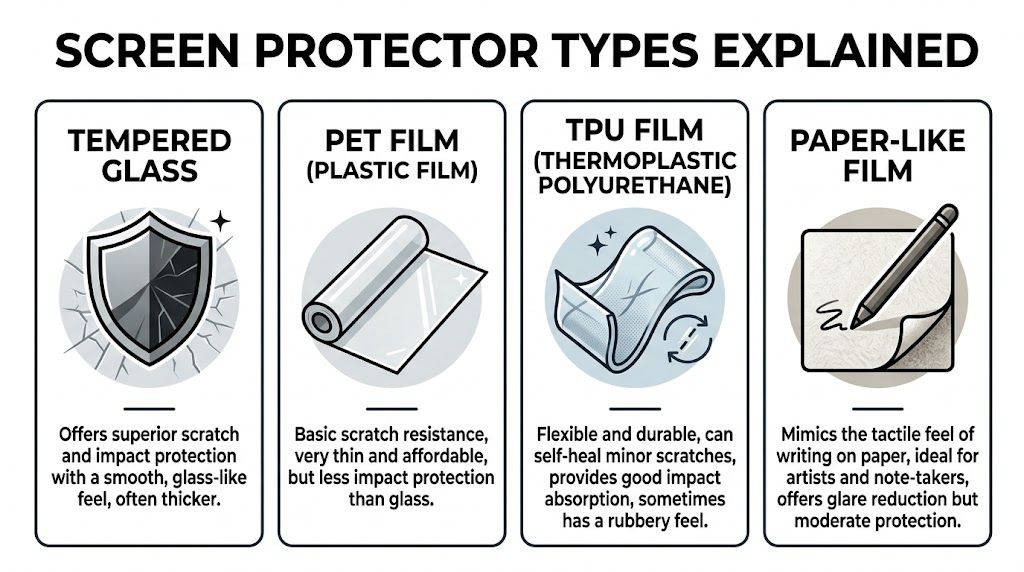
Tempered glass
For most iPad owners, tempered glass is the default recommendation.
In the Australian market, quality tempered glass protectors can reach a 9H pencil hardness rating, use Japanese Asahi glass, show zero surface damage after 10,000 abrasion cycles with steel wool compared with standard plastic films failing after 500 cycles, and quality oleophobic coatings can reduce fingerprints by 70% as specified in this Targus product testing summary.
What that means in plain English:
- Scratch resistance: Better against keys, coins, and daily bag wear.
- Feel: Closer to the original iPad glass.
- Clarity: Usually the best option for keeping the display looking sharp.
- Trade-off: It’s thicker and less forgiving if alignment is poor.
Plastic film and hydrogel-style options
Plastic films come in a few flavours, usually PET, TPU, or hydrogel-style variants. They’re thinner and more flexible than glass.
They make sense when you want basic scratch resistance, lower visual bulk, or a softer edge profile. They’re also useful for people who dislike the added thickness of glass. If you want to understand where softer films fit in, this overview of hydrogel screen protector options is worth a look.
Where they fall short is simple. They’re weaker against harder contact, they mark up faster, and they often don’t feel as smooth under the finger.
Matte and paper-like protectors
These are aimed at a different user.
If you write notes all day, draw with Apple Pencil, or hate glare under bright lights, a matte or paper-like surface can be the better fit. It adds texture and cuts reflections. The downside is that it usually softens contrast, can make colours look less crisp, and tends to wear differently over time.
For artists and note-takers, that trade-off can be worth it. For people who mostly watch video or read detailed documents, it often isn’t.
A simple side-by-side view
| Feature | Tempered Glass | Plastic Film (PET/TPU) | Matte (Anti-Glare) |
|---|---|---|---|
| Protection style | Strong surface protection and better impact resistance | Basic scratch protection | Scratch protection with glare reduction |
| Feel on finger | Smooth, close to native glass | Varies, often softer or slightly tacky | Textured |
| Screen clarity | Usually best | Usually acceptable | Reduced sharpness compared with clear glass |
| Best for | Most users, commuting, family use | Light users, minimalists | Artists, note-takers, bright environments |
| Main downside | More rigid, can crack and needs careful fitting | Weaker against harder wear | Texture and reduced display crispness |
Don’t buy by marketing words alone. Buy by use case. The best protector for a family iPad isn’t always the best one for an illustrator.
How to Choose the Right Protector for Your iPad
Choosing the right iPad screen protector comes down to how you use the device, not what sounds most advanced on the box.
In Perth, the local environment matters too. Fine sand, coastal dust, bright light, and frequent carry-around use change what works well over time.
AU-specific data indicates that tempered glass protectors can lead to a 58% drop in screen damage insurance claims. The same verified data says 67% of iPad Pro owners in northern suburbs like Karrinyup and Greenwood installed protectors to combat glare and abrasions, while 52% of WA iPad users aged 18 to 35 experienced micro-scratches within six months without protection, which could degrade touch sensitivity by up to 15% based on this AU-focused summary.
Match the protector to the person
A better buying decision starts with the user, not the brand.
For students and commuters
Bag travel is the issue here. Chargers, pens, grit, and constant movement wear the screen even when there’s no major drop.
A clear tempered glass protector is usually the safe choice. It keeps the original look of the display, resists daily abrasion better, and feels familiar when you’re tapping quickly between apps, notes, and web pages.
For artists and heavy Apple Pencil users
This group needs to choose between feel and clarity.
A paper-like surface gives more resistance under the Pencil tip, which many people prefer for writing and sketching. But it also changes the look of the display. Colours won’t look quite as crisp as they do through quality clear glass.
If you want a second opinion before buying, Fixo’s guide to the best iPad screen protector gives a useful rundown of common styles and where each one suits best.
For family iPads
Shared devices should lean toward durability. Kids don’t hold tablets delicately, and they don’t always notice crumbs, grit, or rough surfaces before setting the iPad down.
Go for a model-specific tempered glass protector and pair it with a decent case. The protector covers the face. The case handles corners and edges.
Fit matters more than people realise
A poor fit creates its own problems.
- Camera and sensor cut-outs: If the protector is slightly wrong for the model, alignment becomes messy fast.
- Case compatibility: Some protectors lift at the edge once a case presses against them.
- Full-edge coverage: Nice in theory, but only when the adhesive and case tolerances are good.
- Bezel style: Older iPads and newer iPad Pro models often need different cut precision.
Later in the buying process, it helps to see installation and fitment up close.
A practical Perth filter
If you live near the coast, glare and fine abrasion should be part of your decision. If your iPad mostly stays indoors at a desk, a smoother clear glass option is usually easier to live with. If it gets handed around, packed up daily, or used outdoors, favour toughness and cleanability over a barely-there look.
The right choice isn’t the one with the loudest packaging. It’s the one that suits your habits without making the iPad worse to use.
DIY Installation Versus Professional Fitting
A well-made protector can still feel terrible if it’s installed badly. That’s why fitting matters almost as much as the product itself.
The usual DIY problems are easy to recognise. Dust trapped under the middle. One corner slightly crooked. A bubble that keeps coming back. Or the classic mistake, pressing too hard on the wrong point and leaving the whole sheet misaligned.

When DIY works well
DIY is fine if you’re patient, have a clean workspace, and don’t mind starting again if the first attempt goes wrong.
A simple method works best:
- Clean the area first. Not just the screen. Wipe the table, reduce airflow, and keep pets and fabrics away.
- Remove every speck. Use a microfiber cloth, then dust-removal stickers if included.
- Test alignment before peeling backing. Dry-fit it and note camera cut-outs and edge spacing.
- Lower one side first. Hinge-style application gives better control than dropping it from above.
- Push air outward slowly. Use the supplied card or a wrapped bank card, moving from centre to edge.
Where DIY usually goes wrong
Most failed installs aren’t because the person was careless. It’s because iPad screens are large. A large flat surface gives dust more room to land and gives slight misalignment more room to become obvious.
Common issues include:
- Dust nibs: One tiny particle creates a permanent raised bubble.
- Skewed placement: A protector can look straight until the case goes back on.
- Fingerprints under adhesive: Hard to fix once the underside has been touched.
- Edge lift later on: Often caused by uneven pressure during fitting or poor case pairing.
If you’ve already lifted a protector two or three times trying to rescue the install, it’s usually better to stop than keep stretching your luck.
Why professional fitting can be worth it
Professional fitting is less about magic and more about consistency. Clean bench, proper lighting, steady alignment, and no improvising.
That’s especially useful on larger devices and premium protectors where wasting one sheet is frustrating. If you’ve looked into fitted protection on smaller devices as well, this example of an iPhone screen protector service shows the same basic principle. Clean install, proper alignment, less guesswork.
For many people, DIY is perfectly reasonable. But if you know crooked edges and trapped dust will bother you every day, paying for a proper fit can save time, wasted protectors, and annoyance.
Maintenance and Troubleshooting Common Issues
Once the protector is on, the job isn’t finished. How you clean it and how quickly you respond to edge problems decides how long it stays effective.
Keep the surface in good condition
Use a soft microfiber cloth and light pressure. If the screen is greasy, a slightly damp cloth is safer than soaking it with cleaner. Harsh sprays can wear down the coating that helps the glass resist smudges and feel smooth.
A few habits help:
- Wipe grit off before rubbing: Sand and dust can grind across the surface if you clean in a rush.
- Store it sensibly: Don’t throw the iPad into a bag with loose metal items.
- Check corners often: Edge lift usually starts small.
Know what you’re looking at
A lot of people panic when they see a crack line and assume the whole screen is gone. Sometimes it’s only the protector.
Look closely under good light. If the line sits on the outer layer and the display image beneath looks normal, the protector may have done its job. If the image shows distortion, black patches, flickering, or touch problems, the actual screen may be affected.
Replace at the right time
Replace the protector if the edges are lifting, the centre is badly chipped, or the surface has enough wear that it affects visibility and touch.
If you want a broader reminder of what not to do when handling damaged devices, this article on common tech repair mistakes covers several habits that turn minor problems into larger ones.
A scratched protector isn’t a failure. It’s proof that the sacrificial layer took the wear instead of the display.
Your Local Perth Solution at CTF Repairs
A good ipad screen protector won’t stop every accident. It will, however, give your iPad a much better chance of surviving normal life in Perth.
That matters because the common causes of damage aren’t unusual. They’re routine. Desk drops, bag scratches, family handling, coastal dust, and hard flooring all add up. Prevention is cheaper, easier, and less disruptive than screen replacement.
When protection is chosen well, fitted properly, and replaced when worn, it does exactly what it should. It takes the punishment first. That’s the whole point.
If your iPad already has a cracked screen, there’s no value in guessing whether the damage is only on the protector or deeper in the display. Getting it checked quickly helps you avoid using a damaged device longer than you should. If you’re still at the prevention stage, fitting the right protector before the first drop is the smarter move.
For Perth locals, having a nearby repair team matters. Fast turnaround, practical advice, and experience with the kinds of damage that happen in Balga, Mirrabooka, Greenwood, Kingsley, Karrinyup, and nearby suburbs saves a lot of stress when something goes wrong.
If you need help choosing the right ipad screen protector, want a clean professional install, or you’re already dealing with a cracked display, CTF Mobile Phones & Computer Repairs can help with fast, practical service in Perth.