
That sickening thud when your phone hits the floor is just the start. The first real step in any S21 Ultra screen replacement is figuring out exactly what you’re up against. A quick look can tell you if you're dealing with a simple cosmetic issue or a much bigger, more expensive problem with the delicate display panel itself.
Figuring Out How Bad the Damage Is
When your phone clatters onto the pavement, that initial panic is usually followed by a bunch of questions. Is it just the glass, or is the whole display toast? Knowing the difference is critical, as it completely changes the repair job and what you'll end up paying. Getting a clear diagnosis shifts you from a state of dread to having a solid plan.
First things first, get your phone under a bright light and have a good, hard look from every angle. Are you seeing tiny, spidery cracks just on the surface? Or are there deep, black splotches that look like they're bleeding under the glass? If it's the former, you might be in luck—that often means the damage is just to the top layer of glass.
But don't get your hopes up too soon. The S21 Ultra's Gorilla Glass Victus can be deceptively fragile. We see dropped phones all the time; in fact, some repair shops in Perth have said that drops account for up to 70% of S21 Ultra screen replacements since it came out in 2021. It's wild, but we've seen reports where even a small drop from just 20cm onto a soft surface has caused a fracture. This is what leads to those frustrating 'mystery cracks' that start small and creep their way across the whole 6.8-inch OLED display. You can get a better sense of this from this breakdown of common S21 Ultra screen issues.
Going Beyond a Quick Glance
So, the glass is shattered, but the picture underneath looks okay. Great. Now it's time to check if everything still works properly. Try swiping your finger across the whole screen, open a few apps, maybe type out a quick message.
Keep an eye out for these tell-tale signs of deeper trouble:
- Dead Spots: Are there parts of the screen that just don't respond to your touch?
- Ghost Touches: Does your phone start doing things on its own, like opening apps or typing gibberish?
- Flickering or Lines: Is the display flashing, glitching, or showing strange lines, especially when you change the brightness?
- Pixel Problems: Do you see any black spots, bright green lines, or other weird discolourations that have suddenly appeared?
The Bottom Line: If you're noticing any of these issues, the problem isn't just the glass. The damage has reached the Dynamic AMOLED 2X panel underneath. This means you’re looking at a full display assembly replacement, not a simpler glass-only fix.
Knowing the difference between these types of damage is the most important thing you can do right now. It means you can walk into a repair shop and have a proper conversation, knowing exactly what kind of S21 Ultra screen replacement you actually need. This knowledge helps you get a fair quote and a reliable repair, without any nasty surprises later on.
DIY Repair vs. Professional Service: A Realistic Comparison
So, you're faced with a cracked S21 Ultra screen. The big question is: do you tackle the repair yourself or hand it over to a pro? It's tempting to think you can save a few bucks with a DIY kit, but it's crucial to understand what you're getting into, especially with a high-end device like this.
The S21 Ultra isn't like an old phone you can just pop open. It's a precisely engineered machine, sealed tight with strong adhesive. Getting inside requires a heat gun, a steady hand, and a lot of patience just to remove the back glass without shattering it. Once you're in, you're navigating a minefield of tiny screws and delicate ribbon cables.
One wrong move is all it takes. A slight slip of a pry tool could slice the fingerprint sensor cable. A bit too much pressure on a connector could damage the motherboard. These aren't just hypotheticals; we see it happen. What starts as a screen replacement can quickly turn into a much more expensive, or even terminal, repair.
The True Cost of a DIY Mistake
When you go the DIY route, all the risk is on you. There's no warranty on your work, and if something else breaks in the process, that extra cost is yours to bear.
Think about these common pitfalls:
- Damaging other parts: The in-display fingerprint scanner's flex cable is notoriously fragile. Tear that, and you've lost a key feature.
- Hidden tool costs: You'll need more than just a screwdriver. A proper kit with a heat gun, suction cups, and quality pry tools all adds up.
- Dodgy parts: Sourcing a genuine Samsung screen can be a real headache. The market is flooded with cheap, low-quality copies that often have terrible colour, dead spots, or poor touch sensitivity.
Before you even decide, you need to know what you're dealing with. The first step is always a proper diagnosis, whether you're doing it yourself or bringing it to a shop.
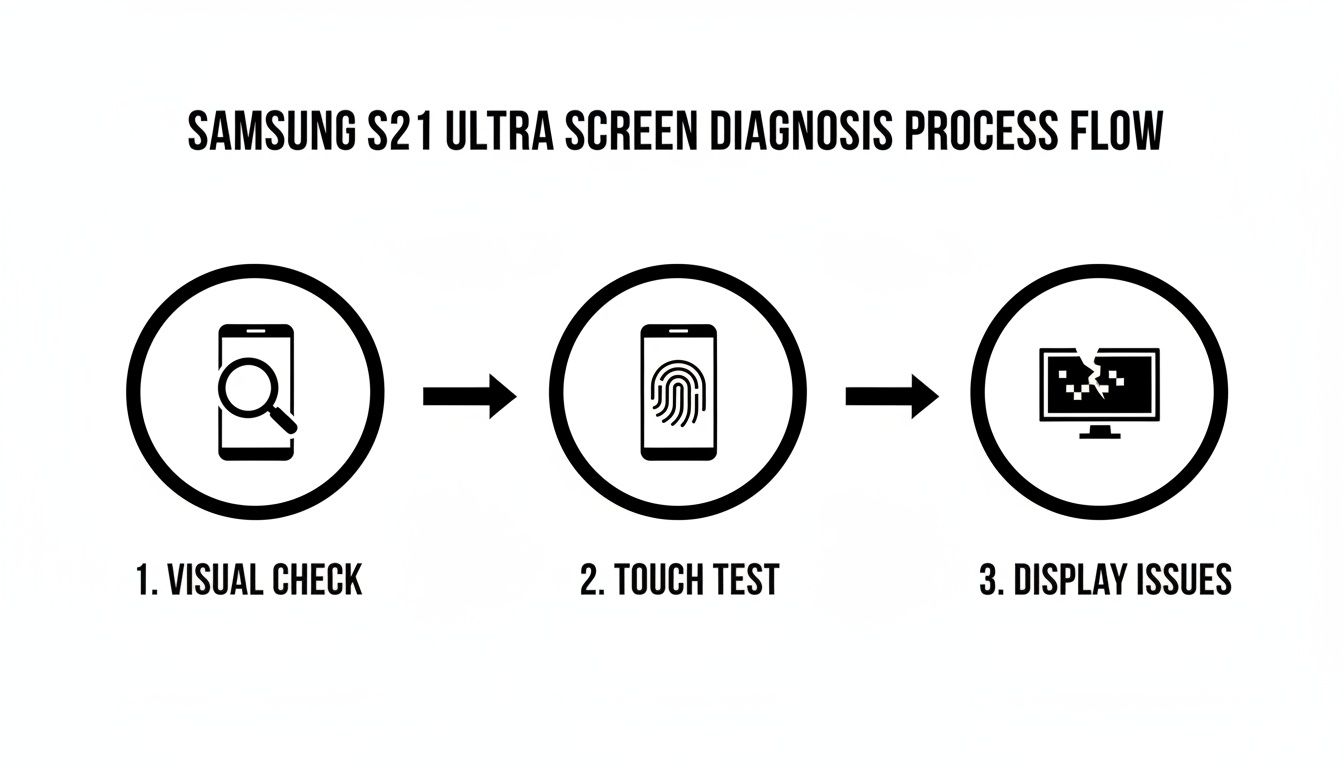
This process helps figure out if it's just the top glass or if the whole display panel is shot. A simple crack is one thing, but a malfunctioning OLED panel is a whole different level of complexity, making a DIY attempt far riskier.
The Professional Advantage: Peace of Mind and Expertise
This is where choosing a professional service like CTF Mobile Phones & Computer Repairs really pays off. It’s not just about convenience; it’s about eliminating all that risk. Our technicians have the right tools, years of experience, and access to high-quality, reliable parts. We've done this exact repair hundreds of times.
The decision between DIY and professional repair often comes down to balancing cost, risk, and time. This table breaks down what you can realistically expect from each path.
DIY vs Professional S21 Ultra Screen Replacement
| Factor | DIY Repair | Professional Repair (CTF Mobile) |
|---|---|---|
| Upfront Cost | Lower (cost of part + tools) | Higher (part + labour) |
| Total Risk | High. You are liable for any damage caused during repair. | Zero. The repair is backed by our expertise and warranty. |
| Part Quality | Variable. Risk of receiving low-quality or faulty parts. | Guaranteed. We use high-quality OEM or premium aftermarket parts. |
| Time Investment | Significant. Hours of research, waiting for parts, and performing the repair. | Minimal. Drop-off service, often completed the same day. |
| Required Tools | You must purchase a specific tool kit (heat gun, pry tools, etc.). | All specialised tools and equipment are provided. |
| Warranty | None on your labour. Part warranty may be voided by installation. | Yes. We provide a comprehensive warranty on both the part and our work. |
| Outcome | Uncertain. Success depends on your skill and the quality of the part. | Guaranteed. A fully functional, professionally repaired phone. |
Ultimately, while the initial cost of a professional repair is higher, you're paying for a certain outcome.
A professional repair isn't just about paying for a new screen; it's about investing in a guaranteed result. You get the peace of mind that comes with a warranty, knowing your phone will be returned to you working perfectly.
Plus, think about your time. Instead of spending a whole afternoon watching tutorials and stressing over tiny screws, you can just drop off your phone and get it back in a few hours. For most people, the certainty and time saved with a professional S21 Ultra screen replacement is well worth it. The value of expertise is something you can't put a price on.
What Does an S21 Ultra Screen Replacement Actually Cost?
Let's talk numbers. Understanding the financial side of an S21 Ultra screen replacement is the first step to making a smart decision. The final bill can swing wildly depending on who you trust with your phone, and knowing the going rates around Perth will stop you from being overcharged.
If you walk into an official Samsung service centre in Australia, you're paying for the badge. There’s no denying you'll get an original part, but that guarantee comes at a premium price. It’s the most expensive route you can take.
Thankfully, the repair world has evolved. Reputable independent shops now offer a far more competitive option without compromising the quality your premium S21 Ultra deserves. This is where the real value is found.
Official vs. Independent Repair Pricing: The Bottom Line
The price gap between going official and going local is pretty significant. For anyone in Perth, choosing a local specialist like us at CTF Mobile Phones & Computer Repairs means keeping more money in your pocket for the same high-quality result.
So, what are we talking about? An official Samsung service centre in Australia will charge a steep $440 AUD for an S21 Ultra screen replacement.
In contrast, our customers here at CTF in Balga can expect to pay between $395 and $415. That’s a direct saving of up to $45 right off the bat. This isn't a new trend, either; since the phone launched in 2021, Australian Samsung repair cost data has consistently shown independent shops offering better value. For our neighbours in Mirrabooka, Westminster, and Kingsley, that means a professional fix without the hefty brand markup.
Choosing a local expert isn't just about saving money. You're supporting a local business and, more often than not, getting faster, more personal service.
What's Included in the Price?
A repair quote should never be a mystery. It's a sum of its parts, and any transparent technician will happily explain what you're paying for.
Your total cost is typically broken down into three main components:
- The Part: The new screen assembly is the biggest chunk of the cost.
- The Labour: This covers the technician's time and expertise to carry out a delicate, complex repair.
- The Warranty: A good repair shop always backs their work. This warranty covers both the new part and the labour, giving you peace of mind.
It’s also wise to be aware of potential hidden costs. A DIY job gone wrong can easily cause more damage, turning a straightforward screen repair into a much more expensive problem. Some shops might also sneak in diagnostic fees. Here at CTF, we keep things simple: the price we quote is the price you pay. No surprises.
When It’s More Than Just a Crack: Spotting Deeper Display Issues
It’s not always a spiderweb crack that signals the end for your S21 Ultra's screen. That stunning Dynamic AMOLED 2X display is a complex piece of tech, and sometimes, it can fail from the inside out, even without a single drop.
These problems can be subtle at first, creeping up on you. You might find yourself wondering if your eyes are playing tricks on you. Is that a ghost of an old app icon still lingering on the screen? Knowing what to look for is the first step toward getting the right repair.
One of the most common culprits I see with OLED screens is screen burn-in, which you might also hear called "ghost imaging." This is what happens when a static image, like the navigation bar or a game's on-screen controls, stays in one place for so long that it leaves a permanent, faint shadow behind.
The Telltale Signs of a Failing Screen
Beyond burn-in, the S21 Ultra’s display can signal trouble in a few other ways. These symptoms nearly always point to a failure within the display panel itself, meaning a simple glass fix won't cut it. A full screen assembly replacement is almost always the only way forward.
Be on the lookout for these red flags:
- A Constant Flicker: Your screen’s brightness starts pulsing or flashing, even when you've turned auto-brightness off. It's a sign the display controller is struggling.
- Green or Pink Lines: This is a classic one. Bright, vertical lines suddenly stripe your screen and refuse to disappear. This usually points to a damaged connector or a dying panel.
- Dead Pixels or Black Spots: You start noticing tiny black dots or larger, spreading "ink blots" on the screen. These are clusters of pixels that have completely failed.
It’s easy to think these internal failures are rare, but they're more common than you'd expect. In fact, display faults like burn-in are a major reason people seek repairs, making up around 20-25% of the Samsung Galaxy S21 Ultra screen replacements we see here in Australia. It's especially common among Perth’s heavy gamers and professionals who have static app elements on their screens for hours at a time. You can discover more insights about S21 Ultra display issues to get a better sense of how often this happens.
So, What’s Causing This?
The magic behind your OLED screen’s vibrant colours and perfect blacks lies in millions of tiny, organic light-emitting diodes. Unlike older LCD screens, these pixels create their own light, but that also means they have a lifespan and degrade over time.
When some pixels are worked harder than others—think of the bright white icons on your navigation bar—they wear out faster. That uneven wear and tear is what creates the dreaded burn-in effect.
Flickering and coloured lines are often caused by a fault in the tiny, fragile electronics that drive the display. These aren't software glitches you can fix with a reset; they're hardware failures. You might spot them early on, but they will almost certainly get worse, eventually making a full S21 Ultra screen replacement unavoidable. If the problem goes deeper than the screen, it could even be related to the motherboard connection, which opens up a whole other world of reliable electronic board repairs in Balcatta. Understanding what's really wrong helps you have a much clearer conversation with your repair technician.
Getting Your Phone Ready for Its Professional Repair
Before you drop off your S21 Ultra for its screen replacement, a little prep work goes a long way. Taking just a few minutes to get your device ready ensures your personal information stays secure and helps the whole process run smoothly. Think of it as a final check-up before you hand it over to us.
The number one priority? Your data. While our technicians here at CTF Mobile Repairs are trained professionals who respect your privacy, backing up your device is simply non-negotiable. It’s your ultimate safety net.
You can easily back everything up to the cloud using Samsung Cloud or Google Drive. Alternatively, transferring your files to a computer with Samsung's Smart Switch application is another great option. This protects all those irreplaceable photos, contacts, and messages, giving you complete peace of mind.
Your Pre-Repair Checklist
Once your data is safely stored somewhere else, a few more quick steps will have your phone primed for its appointment. These actions aren't just about protecting your privacy; they also help our technicians work more efficiently, which means a faster turnaround for you.
Here’s what we always recommend our customers do:
- Remove Your Cards: Pop out your SIM card and any microSD card. Your mobile plan and external files have nothing to do with the screen repair, so it's best to keep them safe with you.
- Sign Out of Key Accounts: Make sure to log out of your Google and Samsung accounts. This is a crucial privacy step that prevents any unintended access to services linked to your phone.
- Disable the Screen Lock: Please turn off your PIN, pattern, or fingerprint lock. Our technicians need to get into the phone's software to test the new screen thoroughly, and this saves us from having to chase you for a password.
Taking these simple precautions ensures the entire repair process is seamless and secure from start to finish. It’s a small investment of your time that provides a significant amount of security.
Ticking these items off the list before you arrive means we can get straight to work on your S21 Ultra screen replacement. It minimises delays and lets our team focus entirely on the technical work at hand.
Once the repair is done, you’ll want to protect that beautiful new screen. You can learn about a tough, modern alternative to traditional screen guards by reading our guide on the benefits of a hydrogel screen protector.
Why a Local Expert is Your Best Bet for an S21 Ultra Repair
After you’ve backed everything up and considered your options, the big decision comes down to who you can trust with your phone. Sure, mail-in services and big brand centres have a certain appeal, but when it comes to getting your S21 Ultra screen replaced, a local Perth expert offers some serious real-world advantages you just can't get from a P.O. box.
Let's be honest, the biggest one is speed. Who wants to be without their phone for days on end? National mail-in services often mean you're stuck waiting, which is a massive headache. At a local shop like CTF Mobile Repairs, we get it. We focus on same-day service, meaning you can often drop your phone off in the morning and have it back in your hands that afternoon, looking brand new.
It's More Than Just a Quick Fix
But it’s not just about getting it back fast. When you go local, you get a level of personal service that’s impossible to replicate from a distance. You can actually talk to the technician who will be working on your device, ask them whatever’s on your mind, and get straight answers. It creates a sense of confidence that’s hard to put a price on.
We make it a point to use top-shelf parts that bring back that stunning display quality and snappy touch response you loved about your S21 Ultra. Plus, every single repair comes with a solid warranty that covers both the new screen and the work we did to install it.
Choosing a local expert means you're not just another ticket number in a system. You're a person who needs their phone back. You get personalised service, clear pricing with no surprises, and the comfort of knowing your valuable device and private data are in safe, professional hands.
Speaking of data, your privacy is paramount. We handle screen replacements without ever needing to dig into your personal files. Everything on your phone stays yours.
If you want to see exactly what this kind of local, high-quality service looks like, you can learn more about our process for a quick and reliable phone screen replacement in Girrawheen. It’s a smart, reliable, and cost-effective way to get a premium repair without the premium price tag or the long wait.
Your S21 Ultra Screen Replacement Questions, Answered
If you're staring at a cracked S21 Ultra screen, you probably have a few questions running through your mind. That's completely normal. Let's tackle the most common concerns we hear from customers every day so you know exactly what to expect.
How Long Will I Be Without My Phone?
This is usually the first thing people ask, and the good news is, it won't be long. A professional repair shop like ours can typically handle an S21 Ultra screen replacement on the same day.
We make sure to keep premium parts in stock specifically for this reason. In many cases, you can drop your phone off and have it back in your hands, good as new, in just a few hours.
Is My Data Safe During the Repair?
Your privacy is paramount. While we always suggest making a backup just in case—it's just good practice—our technicians have no reason to access your personal information. The repair process is purely hardware-focused, meaning your photos, messages, and apps remain secure and untouched.
Will the New Screen Be as Good as the Original?
Yes, absolutely. We source high-quality replacement screens that are designed to meet or exceed the original's performance. You can expect the same stunning colour depth, flawless touch response, and buttery-smooth 120Hz refresh rate you loved about your S21 Ultra.
We stand by our work. Every screen replacement comes with a full service warranty, giving you total peace of mind that the fix is built to last.
What Happens to the Water Resistance After a Screen Repair?
This is a really important one. Once a phone is opened for any repair, the original factory-applied water-resistance seal is broken.
Our technicians apply new adhesive to seal the device, which helps protect it from dust and light moisture. However, your S21 Ultra should no longer be considered water-resistant. We strongly advise against taking it for a swim or exposing it to significant amounts of liquid after the screen has been replaced.
Ready to get that screen sorted by a local Perth expert you can trust? CTF Mobile Phones & Computer Repairs provides professional, same-day S21 Ultra screen replacements backed by a solid warranty.