

We’ve all been there. That gut-wrenching moment when a vital piece of tech just… dies. It’s a universal feeling. Your first move is probably a frantic search for 'computer repair near me', especially when a laptop gives up the ghost right before a big deadline or a gaming console quits mid-session.
If you’re anywhere in Perth's northern suburbs, from Balga to Karrinyup, this guide is here to cut through the panic and show you the way forward.
What to Do When Your Tech Fails
A sudden tech failure throws a spanner in the works, stopping everything from work and study to your downtime. Whether your PC refuses to power on, your Mac is crawling at a snail's pace, or your phone screen is a spiderweb of cracks, the gut reaction is to find someone local who can fix it—fast.
This is where a good local repair shop is worth its weight in gold. It's not just about getting a quick fix; it's about the peace of mind that comes from dealing with real, reliable experts.
When your tech suddenly gives up, an app like supportgpt can be a great first stop. It can help you get a handle on what might be wrong, giving you a bit more context before you even walk into a shop and talk to a technician.
Why Local Expertise Matters
Choosing a local Perth repair service means you’re a person, not a ticket number. It’s about being able to talk directly to the technicians who know the community. From students at Edith Cowan University needing a quick laptop fix to families in Mirrabooka with a broken tablet, a local team just gets it.
Here’s what you gain from keeping it local:
- Same-Day Service: Let's be honest, you need your device back yesterday. Many common issues, like screen replacements or new batteries, can often be sorted out the very same day, so you're not left waiting.
- Transparent Pricing: You’ll get a straightforward quote without any nasty surprises. Knowing exactly what the job will cost before you agree to it is a must.
- Genuine Expertise: Local techs work on all sorts of devices day in, and day out—PCs, Macs, phones, and gaming consoles. That hands-on experience means they know what they're doing.
The real goal is to turn a tech catastrophe into a minor hiccup. A great repair shop doesn’t just fix your gear; it gives you the information you need to make a smart decision for your device and your wallet.
At the end of the day, finding a reliable "computer repair near me" is all about trust. It’s the confidence that your device is in good hands and that you'll get honest advice and quality work backed by a solid warranty. This guide is your first step to finding that confidence.
Running Your Own Quick Diagnostics at Home
Before you even start Googling "computer repair near me," spending a few minutes playing detective can save you time and money. Figuring out the general nature of the problem helps you explain the situation clearly to a technician. It’s the difference between walking in and saying, "It's broken," versus, "My laptop won't boot past the Windows logo." One gets you a blank stare; the other gets the ball rolling.
Think about it. Your work-from-home PC has suddenly slowed to a crawl. Is it a nasty virus hogging all your system resources, or is the hard drive just packed to the brim? Maybe your kid’s laptop is stuck on a dreaded restart loop. That could be a dodgy software update (an easy fix) or a sign that the motherboard is on its last legs (a much bigger problem).
A little bit of troubleshooting helps you figure out if this is something you can tackle yourself or if it’s time to call in the professionals.
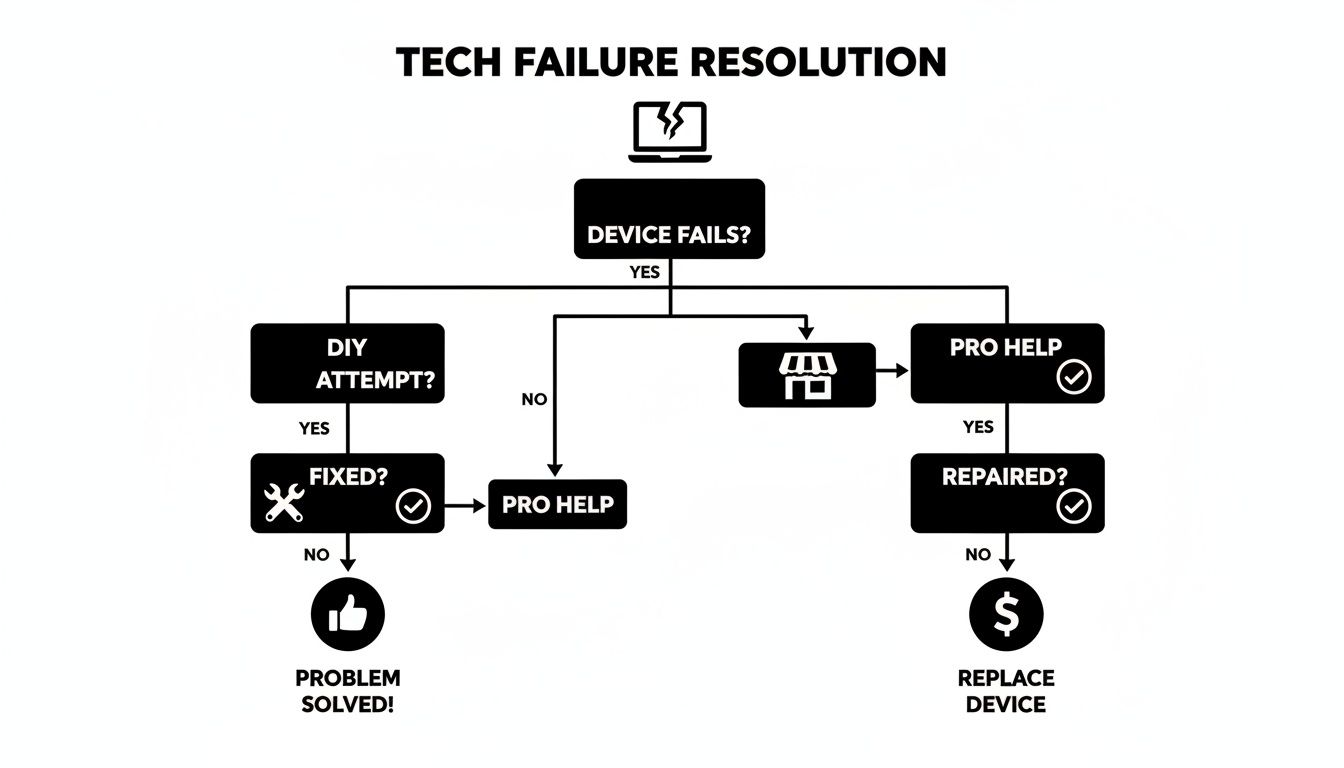
While you might be able to solve simple glitches, this shows that most roads eventually lead to an expert when you need a fix that’s going to last.
Is It a Software Glitch or a Hardware Failure?
The first and most important question to answer is whether the problem lies with your software (the programs and operating system) or your hardware (the physical bits and pieces inside the case). Nailing this down is the single most useful piece of information you can give to a repair shop.
Here are a few classic examples I see all the time:
- Your PC is crawling and ads are everywhere: If your computer has become unbearably sluggish and you’re being bombarded with pop-ups, you're almost certainly dealing with malware or a virus. That’s a software issue, plain and simple. If general slowness is the main problem, our guide on how to fix a slow laptop has some great starting points.
- The infamous "Blue Screen of Death" (BSOD): It looks terrifying, but that blue screen usually comes with an error code. A quick search of that code often reveals whether you’re looking at a driver conflict (software) or something more serious like a memory failure (hardware).
- Weird noises or a total refusal to turn on: Hear a clicking or grinding sound coming from your desktop tower? Or is the machine completely dead when you hit the power button? These are dead giveaways for a hardware problem. It could be a dying hard drive, a fried power supply, or another internal component giving up the ghost.
To help you make an educated guess, here’s a quick way to think about the symptoms you're seeing.
Quick Diagnostic Checklist: Software vs. Hardware
| Symptom | Likely a Software Issue If | Likely a Hardware Issue If |
|---|---|---|
| Slow Performance | It happened suddenly or after installing new software. | The slowdown has been gradual over a long time. |
| Crashing/Freezing | It only happens when using a specific program. | It happens randomly, regardless of what you’re doing. |
| Startup Problems | You see error messages related to the operating system. | The computer makes beeping sounds or shows nothing on screen. |
| Strange Noises | The fans seem to be running louder than usual. | You hear clicking, grinding, or whining sounds. |
| Display Issues | The problem goes away when you reboot. | There are lines on the screen or the display is distorted/dark. |
Remember, this is just a guide to point you in the right direction, not a definitive diagnosis.
The goal of these quick checks isn't necessarily to fix the problem yourself. It’s about gathering intelligence. Being able to tell a technician, "I think my hard drive is making a clicking noise," is infinitely more helpful than just saying it's slow. It helps them get to the root of the problem faster and give you a more accurate quote.
By taking a moment to identify the symptoms, you’re no longer just panicking—you’re an informed customer. This simple step demystifies the issue and prepares you for a much smoother conversation with your local computer repair expert.
Finding a Local Repair Shop You Can Trust
Alright, you’ve done the basics at home and it’s clear you need a professional. The next step is finding a skilled technician you can hand your device over to without a second thought. A quick search for "computer repair near me" will throw a heap of options your way, but let’s be honest, they’re not all the same. The real goal is to find a workshop with a great reputation, honest practices, and the actual expertise your device needs.
This is where a little bit of homework really pays off. Start with recent online reviews on Google or Facebook. But don't just glance at the star rating; dive into what people are actually saying. Are they raving about the quick turnaround? The fair pricing? The friendly tech who explained everything clearly? Those little details tell a much richer story than a simple number ever could.
Vetting Your Local Options
A good repair shop should feel like a trusted local mechanic—someone who gives you straight answers and stands by their work. Here in Western Australia, where IT services spending is helping drive the national forecast towards AU$57.17 billion by 2025, independent workshops are a popular choice. Globally, these smaller shops hold about 30% of the market, but that figure is closer to 35% locally. Why? Because people value that hands-on, community-based trust. If you're interested in the nitty-gritty of these market trends, you can explore detailed IT hardware market reports.
Once you've got a shortlist, it's time to dig a bit deeper. Focus on these key areas:
- Specialised Experience: Do they actually know your device? Fixing a MacBook Pro is a completely different ball game to troubleshooting a custom-built gaming rig or a PlayStation 5. Check their website or, even better, just call and ask if they’re familiar with your specific model.
- Warranty on Repairs: This one’s a deal-breaker. Any reputable shop will offer a warranty on both the parts they use and the labour they perform. Make sure you ask about the warranty period and exactly what it covers before you agree to anything.
- Transparent Quoting Process: They should be able to give you a clear, itemised quote after a proper look. Be wary of any shop that’s vague about costs or tries to pressure you into a decision on the spot without a firm price.
Here’s a red flag I see all the time: a shop immediately suggests a full system wipe for a minor software glitch. A true professional diagnoses the root cause first, rather than jumping to the most extreme (and often easiest) solution.
Asking the Right Questions
Before you hand over your precious tech, have a proper chat. The principles of vetting a local service provider are surprisingly similar across different trades; you can learn a lot from looking at guides on SEO for appliance repair because finding a trustworthy specialist follows the same logic. Having a few sharp questions ready when you call or visit can tell you everything you need to know about their professionalism.
Here’s a quick checklist of what to ask:
- Do you charge a diagnostic fee? Many shops do, but it's often waived if you go ahead with the repair. It's good to know upfront.
- What’s the expected turnaround time? This sets your expectations, which is vital if it’s a device you rely on every day.
- Do you use genuine or high-quality third-party parts? For things like screens and batteries, this is critical. You want a repair that lasts, not one that fails in a few months.
Ultimately, making a confident choice is about finding a technician who is not only skilled but also honest and a good communicator. Taking these extra steps will ensure your device ends up in reliable hands, turning what feels like a tech crisis into a smooth, stress-free fix.
Getting Your Device Ready for a Repair Visit
Before you head down to a local repair shop, taking a few minutes to prep your device can make a world of difference. It's a bit like tidying up before a tradie comes over—it helps them get straight to work, speeds up the entire process, and most importantly, keeps your personal information safe.

The single most important thing you can do? Back up your data. Seriously. We're talking about years of family photos, crucial work files, or that uni assignment you've poured hours into. This stuff is irreplaceable. Even for what seems like a simple hardware fix, a technician might need to reset your system, and that puts your files in the firing line.
First Things First: Secure Your Digital Life
Your number one job is to get a complete copy of everything important off that device. This isn't just a friendly tip; it's an absolute must to protect yourself. A technician's focus is on fixing the machine, not babysitting your data.
For laptops and desktops, an external hard drive is your best friend. You can drag and drop your key folders, or use the built-in tools like Windows Backup or Time Machine on a Mac to create a full system image. If you're not sure where to start, our guide on how to back up your computer files walks you through it.
Here in Perth, we see a lot of water-damaged laptops and USB drives, especially when the winter rains hit. Local data suggests around 22% of devices get a soaking each year. At CTF, we've managed a 92% success rate with these tricky recoveries, all thanks to our secure, warrantied process.
Your Pre-Repair Checklist
Once your data is safely tucked away on another drive, a few more quick steps will protect your privacy and help the tech get on with the job.
- Log out of everything. Sign out of your email, social media, online banking, and cloud accounts like Google Drive or iCloud. It’s a simple step that goes a long way for your privacy.
- Share the login details. The technician needs to get into your device to run tests. You can either write down your password or, better yet, set up a simple, temporary password just for the repair.
- Remove all your personal bits and pieces. Take off any custom cases, unplug the little USB dongle for your wireless mouse, and pop out any SD cards or discs. This just ensures nothing gets lost in the workshop shuffle.
Taking 15 minutes to do this is an investment in your own peace of mind. You're not just handing over a broken gadget; you're entrusting someone with a device that holds a huge chunk of your life. A little prep work makes the whole experience smoother for everyone involved.
Decoding Repair Costs and Timelines
Let's talk about the two biggest questions on everyone's mind: "How much is this going to cost?" and "How long will it take?" Getting a straight answer is key to a good repair experience. Nobody wants a surprise bill, so it’s worth understanding how technicians figure out pricing and timelines.
When you start looking for "computer repair near me," you'll quickly notice a couple of common pricing models. Most workshops will offer a flat-rate fee for straightforward, common jobs. Think of things like replacing a keyboard or upgrading your RAM. These are predictable tasks, so the tech knows exactly what parts and labour are involved.
Then there's the hourly rate. This is usually reserved for the tricky, unpredictable stuff. If your custom-built gaming rig is randomly blue-screening or you’ve got a nasty piece of malware that won't go away, it's going to take some serious diagnostic work. That's when an hourly rate makes the most sense.

Common Pricing Scenarios
To put this into perspective, let’s look at a couple of real-world examples. Swapping out a cracked screen on a standard laptop is almost always a flat-rate job. We’ve done thousands of them, so we know the part cost and how long it takes. For a deeper dive, check out our guide on laptop screen repair costs.
On the flip side, trying to recover precious photos from a physically damaged hard drive is a whole different ball game. The process can be painstaking and success isn't guaranteed, which is why it falls under an hourly rate. The final bill really depends on how severe the damage is and how many hours it takes to get your files back.
Any reputable shop will give you a clear, upfront quote after a proper diagnosis. They should be able to tell you if it's a flat-rate job or provide an estimated number of hours, letting you approve the cost before they start any major work.
Managing Timeline Expectations
Turnaround time is often just as critical as the cost. A simple hardware fix—like a new battery or a RAM upgrade—can often be done the same day, sometimes even while you wait. These are quick jobs because there's no complex troubleshooting involved.
More complicated issues, however, just can't be rushed. Diagnosing a motherboard that only fails intermittently, for instance, requires patient, careful testing. Likewise, complex data recovery can sometimes take several days, especially if specific parts need to be ordered in.
Here in Perth, the independent repair scene is particularly strong. While independents nationally hold about 30% of the market, that figure is closer to 40% in Perth. A big part of this is driven by the over 2.5 million gamers in WA needing fixes for their consoles. With 35% of console faults being simple battery or port issues, a local repair is a much smarter choice than shelling out AU$500+ for a brand new one.
A good technician always keeps you in the loop. They’ll give you a realistic timeline from the start and let you know immediately if there are any unexpected delays. That kind of transparency is what builds trust and lets you plan your life while your device is on the mend.
Got Questions About Computer Repairs? We’ve Got Answers.
When your tech decides to throw a tantrum and you start Googling "computer repair near me," it’s natural for a bunch of questions to start swirling. How much will this cost? Is my data safe? Is it even worth fixing? You're not alone in feeling a bit lost.
We hear these questions every day. So, let's cut through the noise and give you some straight answers to help you make a smart decision and get your device back in action without the stress.
Is It Actually Worth Fixing My Old Computer?
This is the big one, isn't it? The classic dilemma. The answer usually boils down to a quick cost-versus-benefit check. You just need to weigh up the machine's age, the price of the repair, and what you actually need it for.
If your computer is only two or three years old, a repair is almost always the more sensible choice. For instance, swapping out an old hard drive for a new Solid State Drive (SSD) can make a sluggish laptop feel faster than when you first bought it, and for a fraction of what a new one costs.
A good technician won't just try to sell you a service. They'll give you an honest opinion, laying out the pros and cons so you can decide. They should tell you point-blank if a repair is a sound investment or if you'd be better off putting that cash towards a new machine.
How Do I Know My Personal Data Is Safe?
Any repair shop worth its salt will put your data privacy first. It's a non-negotiable. While we always, always recommend backing up your important files before handing your device over, a professional technician operates under strict ethical guidelines.
They should only ever access the files and systems needed to diagnose the problem and perform the repair. Nothing more. For specialised jobs like data recovery, there should be a secure, documented process in place to protect your sensitive information.
Choosing a well-reviewed, local Perth shop means your device is in the hands of professionals who are part of your community. It’s not getting shipped off to some faceless, third-party warehouse where you have no clue who’s looking at your files.
What Kind of Warranty Should I Expect?
A warranty is more than just a bit of paper—it’s a clear signal of the shop’s confidence in their work and the parts they use. Any reputable service will stand behind their repairs, no questions asked.
You should always expect a warranty covering both the parts installed and the labour. The length might vary—a screen replacement will likely have a longer warranty than a virus removal, for example—but the terms should be laid out clearly before any work begins. Never be afraid to ask for the warranty details in writing. It’s your safety net if that same issue decides to make an unwelcome return.
Do You Repair More Than Just Laptops and Phones?
Absolutely. While laptops and phones are the most common casualties, a skilled technician’s toolkit extends to a whole host of other electronics we rely on.
Gaming console repair is a perfect example. Many workshops handle issues with:
- PlayStation consoles (PS3, PS4, PS5)
- Xbox systems (like the Xbox One and Series X/S)
- Nintendo devices (especially the ever-popular Switch)
Common problems range from broken HDMI ports and faulty disc drives to overheating. Technicians also regularly work on tablets and can perform data recovery from just about anything, including USB sticks and external hard drives. It never hurts to ask—you might be surprised at what they can fix.
At CTF Mobile Phones & Computer Repairs, we believe in clear answers and reliable solutions. If you need expert advice or want to book a repair, get in touch with our Perth team at https://www.ctf.com.au.