

That sinking feeling when you see a cracked laptop screen is often followed by one big question: how much is this going to set me back? In Australia, the typical laptop screen repair cost can fall anywhere between $130 and over $800. It's a massive range, and for good reason—the final bill really hinges on your laptop's specific model, screen size, and the type of display technology it uses.
What to Expect for Your Repair Bill
A broken screen can feel like a disaster, but knowing the potential cost upfront makes the whole situation a lot less stressful. The price isn't a simple, flat fee; it's a sum of different parts that change dramatically from one laptop to the next.
Think of it this way: replacing the windscreen on a standard family car is worlds apart from replacing one on a high-end European model packed with sensors. Laptops are exactly the same. The more specialised the screen, the more it costs to replace.
Here in Australia, you can see this play out clearly. A basic 11.6-inch HD screen on a budget-friendly laptop might only cost around $130 to fix. But jump up to a more common 13.3-inch Full HD (FHD) screen, and you're looking at something closer to $250. For gamers or professionals with large 17.3-inch FHD screens, the price can creep up to $275 or more, and that's before we even get to the premium models.
To give you a better idea of what to expect, we've put together a quick guide on estimated costs. This table breaks down the typical price ranges based on screen size and type, giving you a fast, scannable summary.
Estimated Laptop Screen Repair Costs in Australia
| Screen Size / Type | Estimated Cost Range (Parts & Labour) |
|---|---|
| 11" – 13" Standard HD Screen | $130 – $250 |
| 14" – 15.6" Full HD (FHD) Screen | $250 – $450 |
| 16" – 17" or Touchscreen/OLED | $450 – $800+ |
Keep in mind, these are just estimates. If you have a high-end device with a 4K, OLED, or specialised touchscreen, the cost can easily exceed these figures. The best way to know for sure is to get a specific quote for your model.
What Goes Into Your Repair Quote? A Breakdown of the Costs
Ever looked at a laptop screen repair quote and wondered why one person pays a tidy $150 while another is facing a bill upwards of $600? It’s not just a number plucked out of thin air. The final price boils down to a few key ingredients that dictate how complex and costly the job will be.
Think of it like getting your car fixed. You wouldn't expect the parts for a high-end European sports car to cost the same as those for a reliable family sedan. Laptops work on the exact same principle.
The biggest chunk of the cost is almost always the screen panel itself. The size, resolution (how sharp the picture is), and the technology it uses are massive variables. A standard HD screen is much easier on the wallet than a stunning 4K OLED display. If your laptop has a touchscreen, that adds another layer of tech and, you guessed it, more cost—often doubling the price of the part alone.
Your Laptop's Brand and Model Matters
Next up is the make and model of your machine. Premium laptops from brands like Apple, along with Dell's XPS series or HP's top-tier Spectre line, are built with specialised, high-fidelity components that simply cost more for us to get our hands on.
Putting it plainly, fixing the screen on a basic Chromebook is a completely different financial ballpark than replacing the stunning, integrated display on a MacBook Pro. Why? Because those premium models often have razor-thin bezels and complex designs that make the whole process far more delicate and labour-intensive.
It's simple, really: a generic part just won't cut it for a premium device. The custom engineering in high-end laptops means replacement screens are made in smaller batches, which naturally drives up the price from the supplier.
This chart gives you a good visual on how costs tend to scale with screen size.
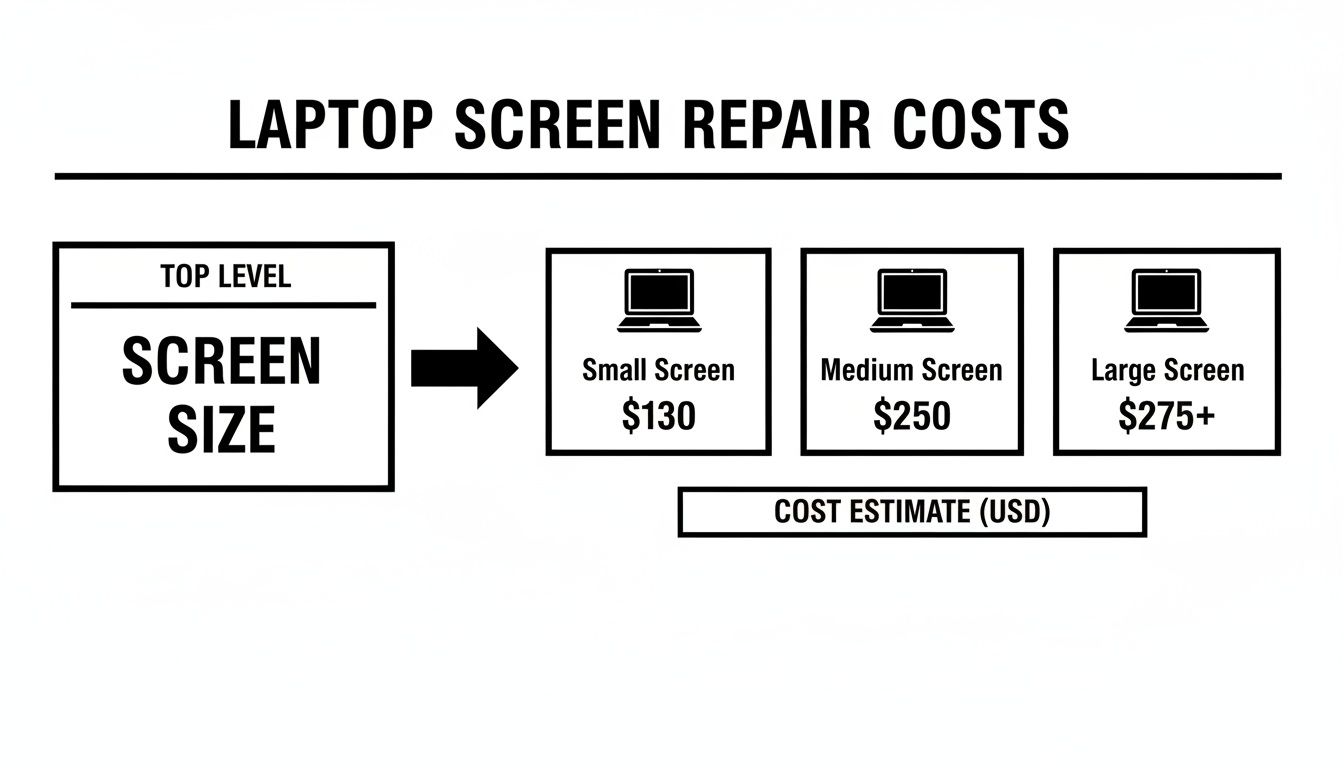
As you can see, the bigger the screen, the higher the starting cost, and that's before we even factor in things like touch capability or ultra-high resolutions. The price difference between brands for the same size screen can also be huge. Take HP, for example: a Chromebook 14 G3 screen repair might be around $140, but a fancy Spectre x360 touchscreen replacement is a flat $440. A top-of-the-line Dell XPS 13 could even climb to $600, which really shows how much the model's prestige impacts the final bill.
Finally, there’s the labour cost. This isn't just about paying for a technician's time; it covers their expertise, specialised tools, and the warranty that backs up their work. While labour costs are fairly consistent across many standard laptops, it's interesting to see how they compare to other devices. For a different perspective, you can see what's involved by reading our guide on iPad screen repair costs.
What You're Actually Paying For: Parts vs. Labour
When a repair shop gives you a quote for a new laptop screen, it's easy to see it as just one big, intimidating number. But that figure is really made up of two distinct parts: the cost of the new screen itself and the charge for the technician's expert labour. Breaking it down helps you see exactly where your money is going.
The part cost is the most straightforward piece of the puzzle. This is simply the wholesale price of the replacement screen panel. It can swing wildly depending on your laptop's make and model. A standard, run-of-the-mill screen might cost the shop less than $100, but a high-resolution 4K touchscreen or a premium OLED display could easily run several hundred dollars on its own.
Labour cost, on the other hand, is what you pay for skill and experience. You're not just renting a pair of hands for an hour. You're paying for a technician's ability to carefully dismantle a delicate piece of electronics, handle tiny, fragile connectors without causing more damage, and reassemble everything so it works just like new.
The Real Value of a Professional Service
That labour fee covers more than just time; it includes years of training, investment in specialised tools, and the significant risk the technician takes on. If you try a DIY repair and accidentally crack the new screen or short out the motherboard, a straightforward fix can quickly become a full-blown disaster.
A professional service is your insurance policy for a successful outcome. The labour cost buys you their expertise, a warranty on the work, and the peace of mind that comes from knowing your device is in safe hands.
This is particularly true when the problem isn't what it seems. A good technician might discover the issue is just a loose internal cable, not a dead screen. Paying a small diagnostic fee upfront could save you from buying a replacement screen you never even needed.
In Perth and across Australia, reputable repairers are transparent about this split. Labour for a screen replacement typically starts around $145–$165, with the final bill landing somewhere between $250–$550 once you add the cost of the part.
Thinking about trying it yourself? It's tempting, but it's worth weighing the pros and cons carefully.
DIY Repair vs Professional Service: A Cost-Benefit Analysis
| Factor | DIY Repair | Professional Repair |
|---|---|---|
| Upfront Cost | Cheaper (parts only) | Higher (parts + labour) |
| Required Skill | High (risk of damaging device) | None (handled by experts) |
| Tools | Requires specialised tool purchase | All tools included |
| Time | Hours of research & work | Quick turnaround (often same day) |
| Warranty | None (if you break it, you buy it again) | Guaranteed work & parts warranty |
| Hidden Risks | Motherboard damage, broken clips, wrong part | Minimal risk, covered by the business |
While the DIY route might look cheaper on paper, the hidden costs and risks can quickly add up. For most people, the guarantee and expertise offered by a professional service provide far better value in the long run.
If you're curious about the business side of things, you can get a better feel for how repair businesses track jobs and costs to manage their operations. It gives you a peek behind the curtain and helps explain why skilled labour is such a vital component of your repair bill.
How Screen Technology Impacts Your Final Bill
It's a common misconception that all laptop screens are basically the same. In reality, the technology powering your display is a massive factor in the final repair bill. Think of it like buying a TV – a basic model is affordable, but a top-of-the-line one costs a pretty penny.
The most budget-friendly replacement is for a standard HD (High Definition) screen. If your laptop has a crisper FHD (Full HD) panel, expect the price to creep up a little, as the part itself is a step up in quality. This is the sweet spot for most everyday laptops.
Where the costs really start to jump is with specialised screens. Laptops with touchscreens, for instance, are a different beast altogether. They have an extra component called a digitiser layered on top to register your finger's touch, which makes the whole unit more complex and expensive to replace.
Premium Panels Push Prices Higher
Then you have the high-end displays. We're talking about the stunningly vibrant OLED screens or the incredibly sharp 4K panels found in premium and creative professional laptops. These offer breathtaking visuals, but that luxury comes at a steep price when it's time for a repair. Because they're not mass-produced like standard screens, the replacement parts are far pricier.
A touchscreen or OLED panel isn't just a screen; it's a multi-layered component that integrates display and input technology. This complexity is why replacing one can easily cost 50-100% more than a standard, non-touch equivalent of the same size.
This difference plays out in actual repair quotes. For example, a basic HD screen replacement in Melbourne might start around $149. But that figure can climb to $260 for a common 15.6-inch screen, and if you have a premium Full HD or Mac screen, you could be looking at another 30-50% on top of that. You can see how the costs vary by exploring some more detailed Melbourne pricing to get a clearer picture.
Making the Call: Repair or Replace Your Laptop?
Staring at a big repair quote puts you at a fork in the road. Sure, your laptop can be fixed, but the real question is whether it should be. This is the moment to set aside your attachment to that old machine and make a smart financial decision.
A great rule of thumb can help clear things up. If the estimated laptop screen repair cost is more than 50% of what your laptop is currently worth, it’s probably time to start shopping for a new one. And we're not just talking about its resale value, but what it would cost to get a new, similar model today.
Assess Your Laptop's Remaining Lifespan
Before you hand over your credit card for the repair, take a hard look at your laptop's overall condition. It's time for a bit of honest self-assessment.
- How old is it? Once a laptop hits the four or five-year mark, it’s getting pretty long in the tooth.
- How's the performance? Was it already starting to lag, struggle with the latest software, or complain about a full hard drive before the screen broke?
- What's the battery life like? If you can barely unplug it without it dying, you've got another looming expense right there.
Forking out $400 to fix the screen on a slow, five-year-old laptop with a shot battery is just not a good investment. You're putting a band-aid on one major issue while other problems are likely just around the corner.
The goal is to avoid sinking good money into a failing asset. The viability of a screen replacement hinges on whether the laptop’s total value justifies the expense. Pouring $400 into a device now only worth $500 rarely makes financial sense.
Technicians here in Perth will often tell you to weigh the repair cost against what you first paid for the laptop. This helps you judge its tier—a major repair on a premium $4,000 machine makes sense, but it’s a much harder sell on an old budget model. You can discover more insights about this logic from repair experts.
How to Find an Affordable and Reliable Repair Service
Knowing the numbers behind your laptop screen repair cost is half the battle. The other half is finding a skilled technician here in Perth who does quality work without charging a fortune.
The first rule of thumb? Shop around and get multiple quotes. Don’t just settle for the first price you hear. You'd be surprised how much costs can differ from one workshop to the next.
You'll quickly find there are two main paths: going back to the manufacturer or visiting an independent repair shop. Official brand services usually have a higher price tag but guarantee original parts. On the other hand, a good local repairer can often match that quality for a much friendlier price.
Vetting Your Local Repair Shop
Before you hand over your laptop, asking a few smart questions can save you a world of headaches later. Any genuine professional will be more than happy to give you straight answers.
Here’s what you absolutely need to ask:
- Part Quality: Do they use genuine OEM-quality screens? This is key to making sure your new display looks and performs just like the original.
- Warranty: This is non-negotiable. A reputable shop will back their work. Look for a minimum 12-month warranty that covers both the new screen and the labour.
- Turnaround Time: How long will it take? If they have to order a special screen for your model, you'll want to know the expected wait time upfront.
Asking these simple questions helps you quickly tell the experts from the cowboys. A technician who is transparent about their parts and process is one you can trust to get the job done right.
The process of finding a great local technician is pretty similar whether you're fixing a laptop, phone, or tablet. For more tips on this, check out our guide on finding a tablet screen repair near you.
Common Questions About Laptop Screen Repairs
When you’re staring at a cracked laptop screen, a few questions are bound to pop into your head before you decide on a repair. Let's walk through some of the most common ones so you can move forward with confidence.
Is a DIY Screen Replacement Cheaper?
It can be tempting to order a replacement panel online and try to save a few bucks. On the surface, it seems cheaper, but the reality is often quite different. One wrong move with a tiny, delicate ribbon cable, or applying a bit too much pressure, can turn a simple screen swap into a much bigger, more expensive problem.
Think of the professional labour fee as an investment. You’re paying for experience, the right tools, and the peace of mind that comes with knowing the job will be done correctly the first time.
How Long Will the Repair Take?
This is usually the first thing people ask! If the repair shop has the right screen for your laptop in stock, the process is surprisingly fast. Many local Perth shops can get it done in just a few hours, often offering same-day service for popular models.
Of course, if your laptop has a less common screen that needs to be ordered in, you might have to wait a few business days for the part to arrive.
A professional repair doesn’t just fix the immediate problem; it ensures no new ones are created. To give your new screen a fighting chance against future mishaps, it's worth learning about the protective benefits of a hydrogel screen protector.
Will a Third-Party Repair Void My Warranty?
This is a big one. The short answer is yes, if your laptop is still covered by the manufacturer's original warranty, getting it repaired by an independent shop will almost certainly void it. In that situation, your best bet is to go directly through the manufacturer.
However, if your laptop is already out of warranty, you're free to choose any reputable, independent repairer without worrying about a thing.
For a reliable and fast fix in Perth, trust the experts at CTF Mobile Phones & Computer Repairs. Book your repair today!