

It’s a feeling every MacBook Pro user dreads: lines suddenly appear across the screen, it starts flickering, or it just goes completely dark. Your first thought might jump to an expensive MacBook Pro display replacement, but hold on. These symptoms aren't always a sign of total failure, and knowing what to look for can save you from a repair you don't actually need.
Diagnosing Your MacBook Pro Screen Problem
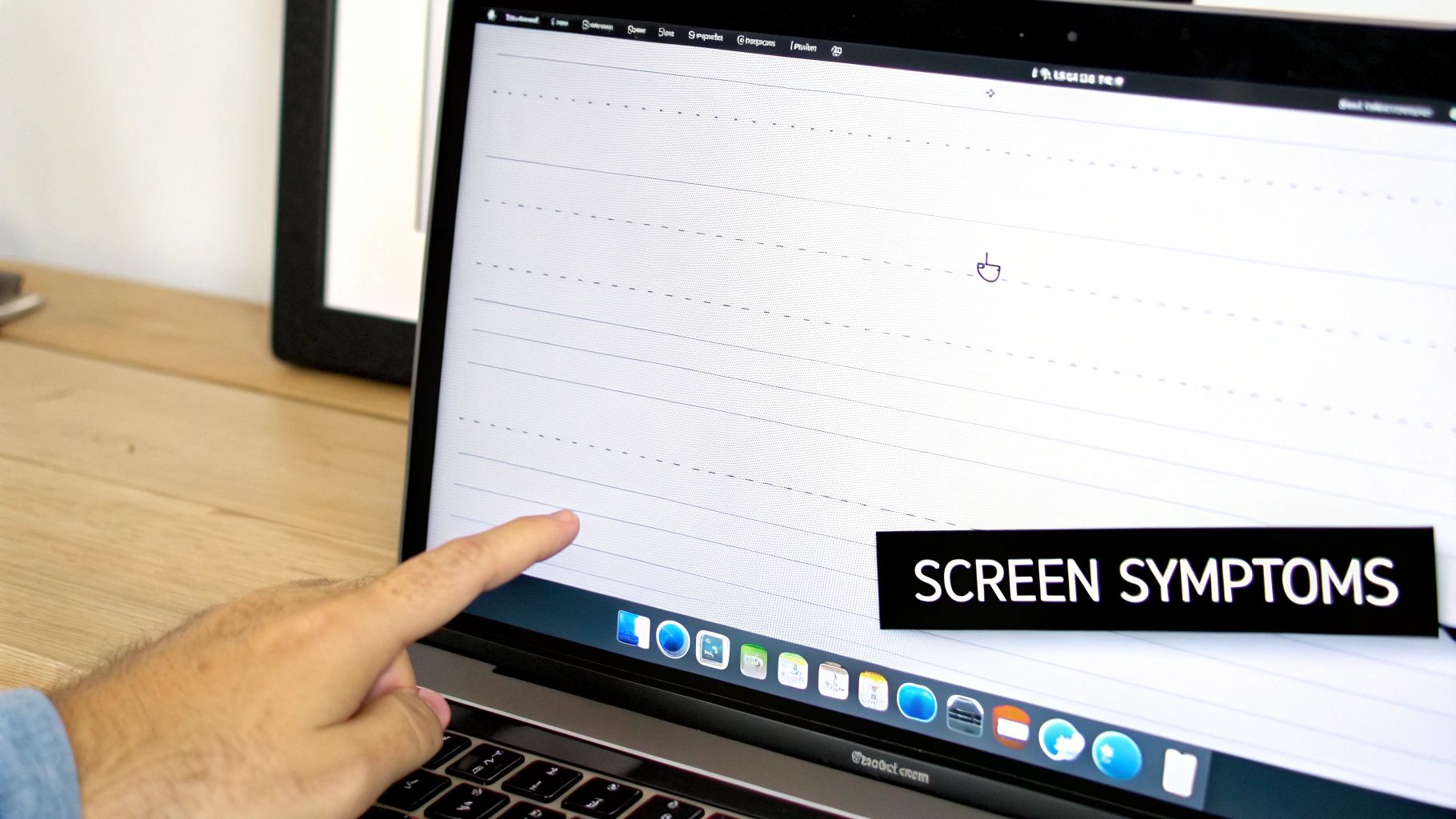
When your MacBook Pro’s screen starts to play up, it’s natural to expect the worst. But not all screen problems are created equal. Some issues are dead giveaways for a necessary replacement, while others might point to a simpler—and cheaper—fix.
Think of it like a flickering light in your house. It could just be a loose bulb that needs a quick twist to tighten, or it could be a completely blown bulb that needs replacing. It's the same principle with your Mac. A random graphical glitch might be a simple software bug, but a cracked screen is obviously a hardware issue. The first step is figuring out which one you're dealing with.
Common Symptoms of a Failing Display
Most display issues fall into a few common categories, and each one tells a story about what’s going wrong inside your machine. If you can identify the symptom, you'll be able to have a much clearer conversation with a technician about what needs to be done.
Here are the most common signs that your screen is on its way out:
- Vertical or Horizontal Lines: Seeing coloured or black lines streaking across your display usually points to a damaged LCD panel or a loose connection between the screen and the Mac’s logic board.
- Flickering or Random Blackouts: A screen that flickers, dims, or goes black without warning often signals a backlight problem or a faulty display cable. This is a classic symptom of the "Flexgate" issue that affected certain MacBook models.
- Dead Pixels or Dark Spots: These are the tiny black or coloured dots that stay put no matter what's on the screen. A couple might be easy to ignore, but a large cluster can make your MacBook almost impossible to use.
- Discolouration or "Stain" Marks: If you notice weird colour tints, washed-out images, or dark patches that look like stains, it’s likely a problem with the layers inside the LCD panel itself, often caused by liquid damage or excessive pressure.
Identifying the specific symptom is key. It's like telling a mechanic "my car is making a clicking sound when I turn left" instead of just "it's making a noise." The more detail you can provide, the faster and more accurate the diagnosis will be.
Getting familiar with these signs is a great start. For a more detailed look at troubleshooting, check out our guide on how to fix common laptop screen problems. Pinpointing the exact issue is the best way to ensure you only pay for the MacBook Pro display replacement you actually need.
Your MacBook Pro Repair Options Compared
When your MacBook Pro screen gives up the ghost, you're essentially at a fork in the road. One path leads to an Authorised Apple Service Provider (AASP), and the other takes you to a trusted independent repair specialist like us. Figuring out which way to go comes down to what matters most to you—your budget, your timeline, and your priorities.
Going the authorised route is what most people think of as the "official" choice. The biggest drawcard here is the guarantee of genuine Original Equipment Manufacturer (OEM) parts, straight from Apple's supply chain. This means you get a perfect match in quality and function, all backed by Apple’s own warranty. But that peace of mind definitely comes at a price.
Authorised repairs are almost always the more expensive option. You’re not just paying for the screen itself, but also for Apple's strict corporate processes and significant overheads. On top of that, the wait can be long. It's not uncommon for repairs to take over a week, especially if your MacBook has to be shipped off to a central depot.
The Independent Repair Advantage
This is where a good independent repair shop really shines. We offer a far more flexible and, frankly, more practical solution for most people. The most obvious benefit? The cost. By using top-tier aftermarket screens that look and perform just like the originals, we can offer a MacBook Pro display replacement for a fraction of what an authorised centre charges.
You save a significant amount of money without any real-world drop in quality. A good analogy is getting your car serviced. You could take it back to the dealership, or you could go to the local mechanic you trust. Both get the job done right, but the local expert usually offers better value and a more personal touch.
The real value of an independent shop is our ability to find solutions that work for you. We can often get our hands on parts for older models that authorised centres have stopped supporting, which means we can keep your trusty MacBook going for years longer.
Speed is another area where we have the edge. We keep common parts in stock and don't have to navigate layers of corporate red tape. This means we can often get a screen replacement done and dusted in just a few days, so you're not without your machine for long.
Making an Informed Decision
At the end of the day, the right choice really hinges on your personal needs. To make it a bit clearer, here’s a quick side-by-side look at the key differences:
| Feature | Authorised Apple Service Provider | Independent Repair Specialist |
|---|---|---|
| Part Quality | Guaranteed Genuine OEM | High-Quality Aftermarket |
| Cost | High (Premium Pricing) | Lower (Better Value) |
| Turnaround Time | Slower (Often days to weeks) | Faster (Often 1-3 business days) |
| Warranty | Backed by Apple | Backed by the local shop |
| Flexibility | Limited to current models | Can often repair older models |
It's also worth thinking about the bigger picture. Choosing to repair your device locally helps reduce electronic waste and supports consumer rights. If you're interested, learning about the Right to Repair movement and its impact on e-waste offers some great insight into why supporting independent shops is a win for your wallet and the planet.
Understanding MacBook Screen Repair Costs in Australia
The thought of a vague, open-ended bill for a MacBook Pro display replacement can be a real source of stress. But the final price isn't some big mystery. It actually comes down to a few key, predictable factors. Once you know what they are, you can get a much clearer idea of the cost and avoid any nasty surprises.
The biggest single factor is your specific MacBook model and its year of manufacture. It’s a bit like buying parts for a car—a headlight for a brand-new performance model is always going to be more expensive than one for a ten-year-old family car. The same principle applies here. Newer MacBooks with more advanced screen technology simply cost more to fix.
Key Factors Influencing Repair Costs
A few different things come together to create your final quote. Your MacBook’s model number (like A1707 or A2338), its screen size, and the type of display technology it uses are the main drivers behind the price.
Here’s a breakdown of what makes the biggest difference:
- Model and Year: Newer models have incredibly complex, integrated displays that are more expensive to produce and, therefore, to replace. Parts for older models are generally much more affordable.
- Display Technology: There's a world of difference between a high-resolution Retina display with ProMotion and True Tone and the standard, non-Retina screens found on much older MacBooks. That difference is reflected in the repair cost.
- Screen Size: This one is pretty straightforward. A larger 16-inch display will naturally be more expensive to replace than a smaller 13-inch one, simply because the panel itself costs more.
According to figures from Australian repair specialists, the price gap can be huge. For older MacBook models like the A1465 and A1466, you’re typically looking at a screen replacement costing between $450 to $500 AUD.
In stark contrast, the price jumps significantly for more recent models. For instance, replacing the display on a 15-inch MacBook Pro (models A1707, A1990, A2141) can set you back anywhere from $1,200 to $1,500 AUD. That's a massive increase.
Cost Comparison: Independent vs Authorised Repairers
Where you take your MacBook for repair also plays a massive role in the final bill. As we mentioned earlier, Authorised Apple Service Providers and independent specialists like us operate on very different pricing structures. Authorised centres are required to use official Apple parts and follow their set pricing, which almost always comes in higher.
Independent shops, on the other hand, can source high-quality aftermarket screens directly from manufacturers. This cuts out the middleman and allows us to pass those significant savings directly on to you. It's an approach that delivers fantastic value without ever compromising on the quality of the repair.
Choosing an independent repairer often means you're getting a functionally identical repair for a significantly lower price. You get the same crystal-clear display and performance, but with hundreds of dollars left in your pocket.
To give you a clearer picture, we've put together a table showing what you might expect to pay for a MacBook Pro display replacement at both types of service providers in Australia.
Estimated MacBook Pro Display Replacement Costs in Australia
This table gives a general idea of the price differences you'll encounter. For a more detailed look tailored to your specific situation, check out our complete guide on laptop screen repair costs in Australia.
| MacBook Pro Model (Examples) | Typical Authorised Repair Cost (AUD) | Typical Independent Repair Cost (AUD) |
|---|---|---|
| 13-inch (Pre-2017) | $700 – $900 | $450 – $650 |
| 13-inch (2017-2022) | $950 – $1,200 | $650 – $850 |
| 15-inch (2016-2019) | $1,200 – $1,500+ | $900 – $1,200 |
| 16-inch (2019 onwards) | $1,400 – $1,800+ | $1,000 – $1,400 |
As you can see, the savings at an independent shop can be substantial, often amounting to several hundred dollars for the exact same outcome: a perfectly working screen.
What Really Happens During a Professional Screen Repair?
Ever wondered what goes on behind the counter after you drop off your damaged MacBook Pro? A professional MacBook Pro display replacement isn't just about popping off an old screen and slapping on a new one. It’s a delicate operation, a multi-step dance of precision that requires specialised tools and a steady, experienced hand to get your machine back to factory-fresh condition.
Let's pull back the curtain and see why this is a job best left to the pros.
It all starts with a thorough diagnostic. Before a single tool is picked up, our technicians run a full health check on your MacBook. We need to be 100% certain the screen is the only problem and that there aren't any sneaky secondary issues hiding. This crucial first step makes sure we’re fixing the root cause, so you don’t get any nasty surprises down the line.
The Technical Teardown
Once we've confirmed the diagnosis, the careful work of disassembly begins. Using purpose-built, non-marring tools, we gently remove the bottom case, disconnect the battery (an absolutely vital safety measure), and then painstakingly detach the web of tiny, fragile connectors that link the display to the logic board. This is where experience is everything—one slip could spell disaster for your MacBook’s main board or other critical parts.
Next, we focus on removing the damaged display assembly itself:
- Hinge Screw Removal: This requires specific drivers to carefully release the screws holding the display to the chassis.
- Antenna and Cable Detachment: The Wi-Fi antenna and several paper-thin ribbon cables have to be disconnected and safely moved out of the way.
- Sensor Calibration: Newer MacBooks have sensors that need to be handled with incredible care to preserve features like the auto-boot when you lift the lid.
You can think of it like keyhole surgery for your laptop. Every move is calculated, performed with the right tool for the job, and backed by a deep understanding of the machine’s complex internal layout. There's simply no margin for error.
This diagram gives you a clear picture of how repair costs can vary between older and newer MacBook models.
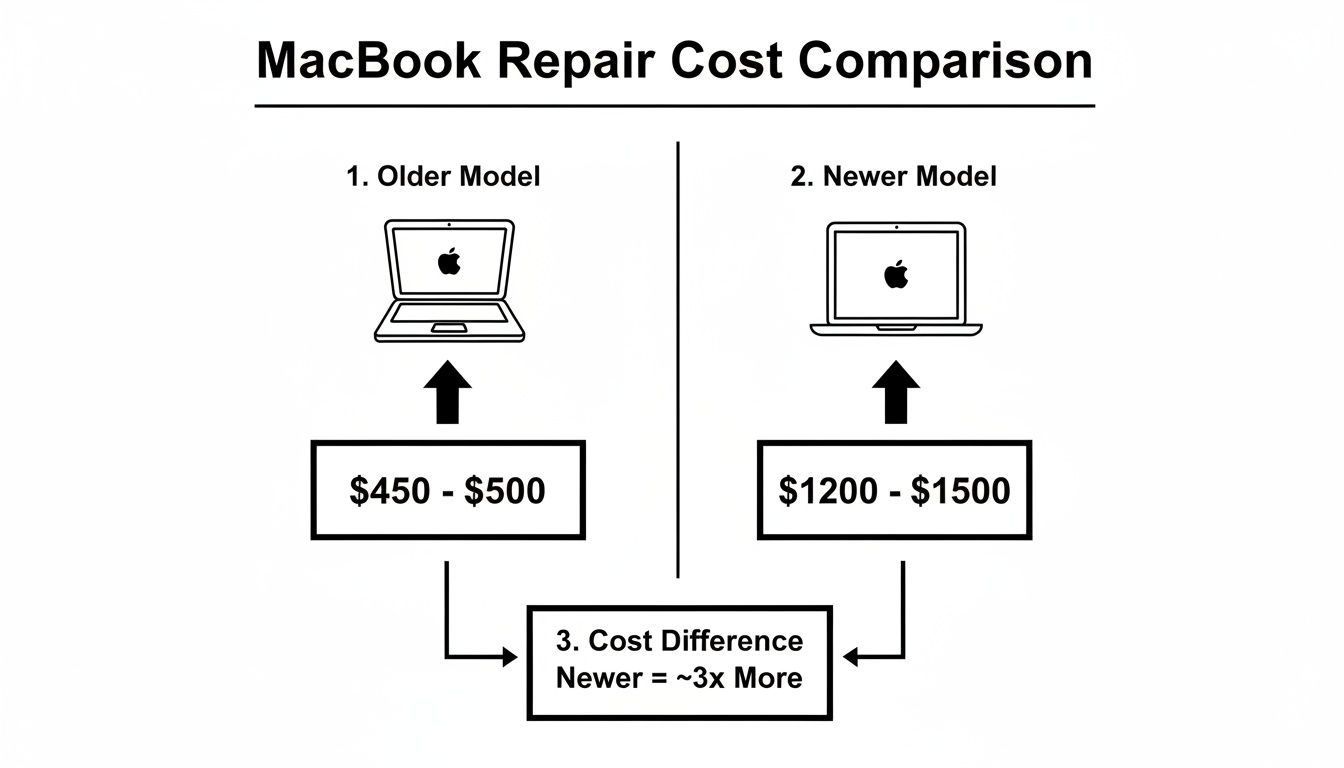
As you can see, the highly integrated nature of the newer displays is a big reason why their replacement costs are so much higher.
Final Checks and Quality Assurance
With the new screen securely installed, we meticulously reverse the entire process. Every screw goes back exactly where it came from, and every connector is re-seated with precision. But we’re not done yet.
The final—and arguably most important—step is our quality assurance check. We run the MacBook through a complete battery of tests to ensure every single function related to the display is working perfectly.
This includes checking the:
- FaceTime Camera: Is it activating properly and giving a crisp, clear image?
- Microphones: Are they picking up audio loud and clear?
- Ambient Light Sensor: Does the screen brightness adjust to the room’s lighting?
- True Tone Functionality: Is the display correctly adjusting its colour temperature?
Only when your MacBook Pro has passed every single one of these tests with flying colours do we consider the job done. This rigorous, end-to-end process is what professional service is all about—delivering a repair you can count on.
How Warranties and AppleCare+ Affect Your Repair
Figuring out your warranty status is the first thing you should do when facing a MacBook Pro display replacement. It’s the single biggest factor that will influence the final cost, so it pays to know where you stand with Apple's standard warranty versus their extended AppleCare+ plan here in Australia.
Every new MacBook comes with a standard one-year limited warranty, which is fantastic for dealing with manufacturing defects. If your screen suddenly develops dead pixels or a backlight issue out of the blue, you're covered. But, and this is a big one, it provides zero protection against accidental damage. Drop your MacBook and crack the screen? That repair bill is coming straight out of your pocket.
AppleCare+ for Accidental Damage
This is where AppleCare+ completely changes the conversation. Think of it as an insurance policy for your Mac, specifically designed to cover accidental damage from handling. Instead of staring down the barrel of a full, and often eye-watering, repair cost, you just pay a much more predictable service fee for each incident.
For a cracked screen, the savings can be huge. A quick look at Apple's Australian support pages shows an out-of-warranty screen replacement can set you back anywhere from $455 to $1,500 AUD, depending on the model. With AppleCare+, you pay a small, fixed fee instead. It’s worth checking out Apple's coverage details to see just how stark the difference is.
In short, AppleCare+ turns a potential financial disaster into a manageable expense. It’s a bit like paying a small excess on your car insurance instead of footing the bill for a whole new engine after a bingle.
Is Using an AppleCare+ Incident Worth It?
So, should you use one of your AppleCare+ incidents for a screen repair? From a purely financial standpoint, the answer is almost always a resounding yes. The service fee is a fraction of the out-of-pocket cost, often saving you hundreds, if not thousands, of dollars.
Here’s a simple way to look at it:
- With AppleCare+: You have a clear, fixed, and affordable cost for your MacBook Pro display replacement. If you have it, this is your most cost-effective option, hands down.
- Without AppleCare+: You're on the hook for the full repair bill from an authorised provider. This is the point where getting a quote from a trusted independent repairer becomes a very smart move, as we can often deliver the same quality repair for a much better price.
Choosing a Trusted Local Repair Specialist

When your MacBook Pro’s display goes down, you need a fix that’s both reliable and fast. While you could go through an authorised dealer, a specialised local expert often delivers a mix of skill, value, and speed that’s tough to beat.
Choosing a local team means you’re putting your device in the hands of technicians who live and breathe Apple products. This isn't just another job for them; it’s their specialty. That dedicated focus leads to quicker, more accurate diagnostics and repairs you can count on.
The Benefits of a Local Expert
The real advantage of going with a local specialist comes down to what matters most: your time and your money. You get the quality of a manufacturer repair without the premium price tag or the long waits that often come with it.
Here’s what you can expect:
- Competitive and Transparent Pricing: Because we source high-quality parts directly, we can pass those savings on to you. You get a first-rate repair without paying for brand overhead.
- Quick Turnaround Times: Independent shops don’t have the corporate queues you’ll find at big service centres. We can often get your MacBook back to you in just 1-3 business days, so you’re not without it for long.
- Personalised Service: You get to speak directly with the technician who’s actually working on your machine. This means clear, straightforward answers and service that fits your specific situation.
If you’re interested in what makes a business reliable, this guide to understanding how businesses build trust offers some great insights into building a solid reputation.
Choosing a trusted independent shop is like finding a great local mechanic. You get expert service, fair pricing, and a direct line to the person actually doing the work, ensuring your valuable device is in safe hands.
And it’s not just MacBooks we look after. If your other gadgets are giving you grief, our expertise covers a huge range of devices. You can find out more about our services for tablet screen repair near you right here on our site.
Got Questions About Your MacBook Pro Screen Repair? We Have Answers
Even with all the details, you probably still have a few questions buzzing around. That’s completely normal. Getting clear answers is the best way to feel confident you’re making the right call for your MacBook.
Let's tackle some of the most common queries we get from customers every day.
How Long Will I Be Without My MacBook?
This is usually the first question on everyone's mind! At a professional independent shop like ours, we can often get a screen replacement done in just 1-3 business days, depending on whether we have the specific screen for your model in stock. We know how much you rely on your machine, so we work efficiently to get it back in your hands.
Going through an authorised service centre, on the other hand, can be a different story. You're often looking at a week or even longer, especially if they have to send your MacBook away to a central repair facility.
Is My Data Safe During the Repair?
Yes, it is. A screen replacement is purely a hardware job. We don’t touch your hard drive or the data on it, so all your documents, photos, and apps will be exactly where you left them.
That said, we always recommend backing up your device before any repair. It’s just good practice. A quick backup with Time Machine gives you that extra layer of security and total peace of mind.
Think of it like getting a new windscreen on your car. The mechanic replaces the glass, but they don't go near the engine or rifle through your glovebox. Your data is separate from the display hardware, just like the contents of your car are separate from the glass.
Is It Really Worth Fixing an Older MacBook Pro's Screen?
This is a great question, and it really comes down to two things: the overall health of your MacBook and how the repair cost stacks up against its current value. For many older models that are still running strong, a new screen is a fantastic, cost-effective way to get a few more years of solid use out of them.
It's almost always significantly cheaper than forking out for a brand-new machine. We're always happy to give you a straight-up quote and an honest opinion to help you decide if the investment is right for you. Our goal is to make sure you get the best possible value from your trusty device.
Ready to get that screen sorted? The expert team at CTF Mobile Phones & Computer Repairs is here to help with a fast, affordable, and reliable MacBook Pro display replacement. Get in touch today for a free, no-obligation quote and let's make your MacBook look brand new again.